Piece by Piece Backup
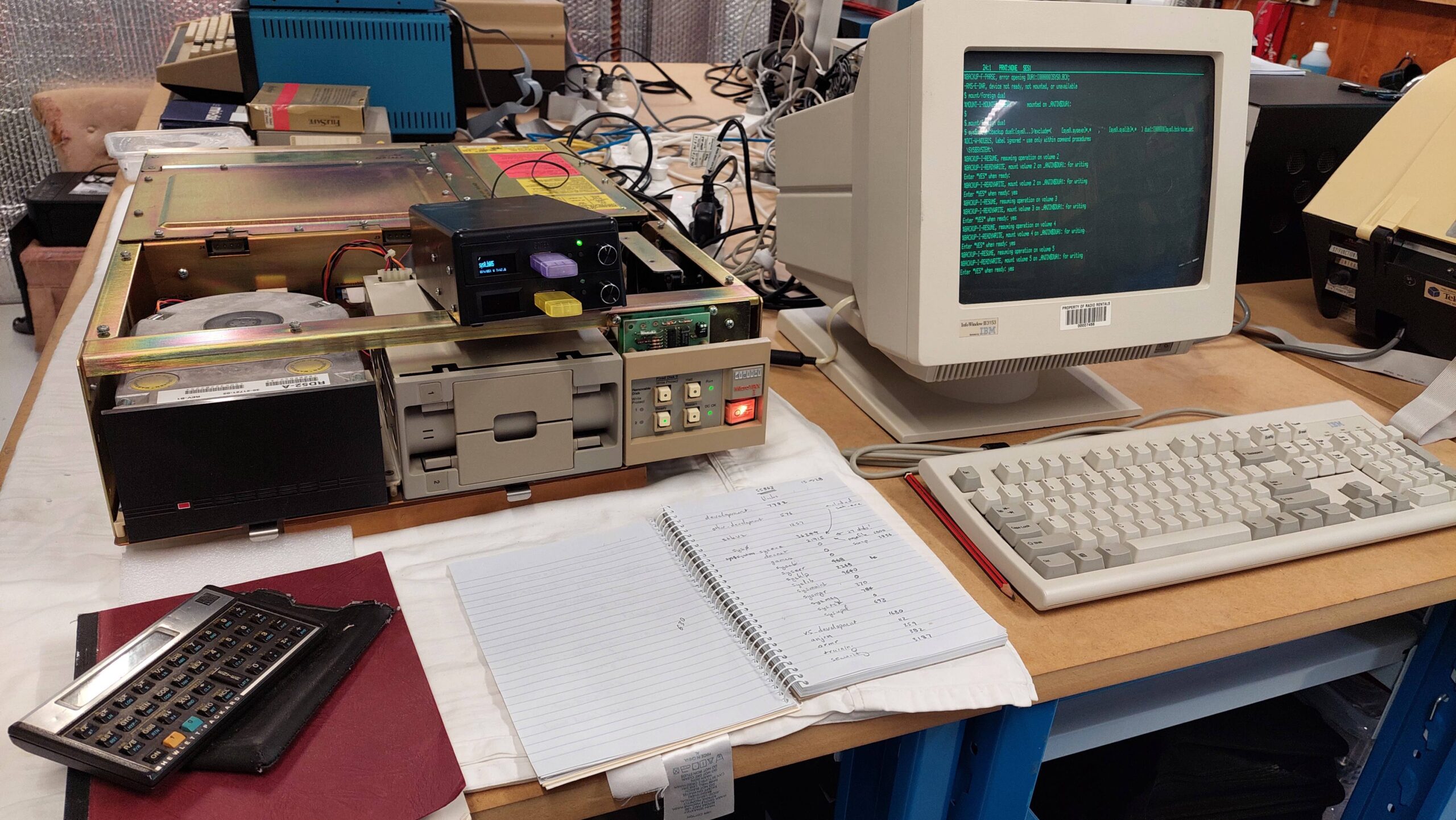
The simplest approach, although arduous, is to backup to floppy disk. The hard disk is close to full. With a disk capacity of 400kB this will about 75 disks.
The machine has a RD52-A hard disk with a capacity of about 30MB. Ideally this would be backed up using an image backup to a solid state drive with a matching configuration. Maybe one day i will have such a drive but presently i do not.
Doing this with real floppy disks would be unlikely to succeed – there would inevitably be a bad sector and the process would grind to a halt. The odds improve with solid state storage but i would still run the risk of a bad sector on the hard disk causing a halt.
Instead, of doing one single backup i thought it might be more practical to do it in sections requiring less than 20 disks.
I started by working out where stuff was stored in the directory structure. This means running a bunch of directory commands eg.
dir dua0:[000000] /size /grand_total
dir dua0:[sys0] /size /grand_total
This revealed a tree as follows:
| Directory (- is one level) (> is a file) | Size (blocks) | Approx Floppy Disks (800 blocks) |
| dua0:[000000] | 55863 | 70 |
| -development | 7782 | 10 |
| -v5_development | 1680 | 3 |
| -security | 3187 | 4 |
| -sys0 | 36244 | 46 |
| –syslib | 9640 | 13 |
| –sysexe | 21915 | 28 |
| –>pagefile.sys | 6800 | Not backed up |
| –>swap.sys | 3836 | Not backed up |
| —the rest of sysexe | 11279 | 15 |
| –the rest of sys0 | 4689 | 6 |
| –the rest of root | 6970 | 9 |
I backed up the bolded folders above. This required using the exclude option for some backups and that gets quite complicated (for me).
Along the way i learnt that the first disk needs to be initialised and mounted as foreign. The backup command to floppy disk is of the form:
$ sys$system:backup <input> <output>| Directory | <Input> | <Output> |
| dua0:[000000] | ||
| -development | dua0:[development…] | dua1:[000000]development.bck/save_set |
| -v5_development | dua0:[v5_development…] | dua1:[000000]v5_development.bck/save_set |
| -security | dua0:[security…] | dua1:[000000]security.bck/save_set |
| -sys0 | ||
| –syslib | dua0:[syslib…] | dua1:[000000]syslib.bck/save_set |
| –sysexe | ||
| –>pagefile.sys | ||
| –>swap.sys | ||
| —the rest of sysexe | dua0:[000000…]/exclude=(*.sys) | dua1:[000000]sysexe.bck/save_set |
| –the rest of sys0 | dua0:[sys0…]/exclude=([sysexe…],[syslib…]) | dua1:[000000]sys0.bck/save_set |
| –the rest of root | dua0:[000000…]/exclude=([development…],[v5_development…],[security…],[sys0…]) | dua1:[000000]root.bck/save_set |
It took a lot of experimenting to get the hang of the backup command. Some of the commands became very long, so i changed the terminal settings to use 132 columns. Commands and qualifiers can be abbreviated as long as uniqueness is unaffected.
| Directory | Approx Floppy Disks (800 blocks) | Actual Disks |
| -development | 10 | 13 |
| -v5_development | 3 | 3 |
| -security | 4 | 5 |
| –syslib | 13 | 16 |
| —the rest of sysexe | 15 | 18 |
| –the rest of sys0 | 6 | 10 |
| –the rest of root | 9 | 9 |
Several files were not copied because they were locked including accounting.dat and operator.log. Pagefile.sys and swap.sys were excluded but probably would have been locked.
Backing up sysexe gave an error re a bad block in dua0:[sys0.sysexe]set.exe and stopped the backup. I can’t see this file so i just excluded it. Perhaps a disk integrity issue.
The files in a save_set can be listed using:
$ mount/foreign dua1:
$ sys$system:backup/list dua1:[000000]<name>.bck/save_set
It will prompt for each disk. It was curious to see that some disks seemed to be more full than others. Perhaps it splits files across disks. Not sure.
I believe i have now taken a copy of everything that matters from the hard disk. I don’t think this would be sufficient to rebuild the disk as it stands right now; i have no boot track.
Image Backup
To achieve this i would need to do an image backup. Given the number of disk required, that looked daunting at the start, but it seemed possible after getting some confidence in the backup process. I tried it.
I created about 100 blank floppy disk images and loaded them on to a gotek.
I created a standalone backup kit using three blank floppy disk images on the gotek. The MicroVAX was then booted with the standalone backupkit and the image backup was done with the blank images.
$ backup/image/log dua0: dua2:hdimage.bck/save_setThe backup used 68 disk images and took about 100 minutes.
These disks (including the standalone backup kit) were then converted from the IMG to DSK using dsk2simh.py as described here.
I created a new instance of the simh MicroVAX I and attached an empty disk to dua0:. I used the same standalone backup kit to restore the original disk image to the emulation.
$ backup/image/log dua2:hdimage.bck/save_set dua0:The restoration was faster because simh runs faster than the real hardware, but is more tedious because of the convoluted process for changing media.
It was a great relief to see it come up. There was one reported issue, but otherwise it seems to behave in much the same way as the physical system. This ticks two boxes: firstly the backup seems to be good, and secondly i have a good emulation of the physical MicroVAX I as received (more or less).
The reported issue was:
%%%%%%%%%%%  OPCOM  28-APR-2026 20:37:46.41  %%%%%%%%%%%
Microcode for device _PUA0: (RD/RX controller) is not up to the current revision level
I think this is saying that the storage controller used by simh is earlier than that on the physical hardware. I could try running sysgen.
As i have no V4.4 installation disks it may be impossible to add devices, eg an ethernet card, unless the driver is already installed. This may prove limiting.