VT202/1303 Comms Card & Kermit

I have a couple of working Lexitron word processors that run the CP/M operating system. They use an unusual disk format for which i have no means of decoding or encoding. The only input that these machines have is the keyboard which is a somewhat tedious means of transferring programs and data. This has limited the applications that i have been able to transfer to these machines.

Documentation and the CP/M implementation both suggested that Lexitron produced a communications card that could do asynchronous serial communication but i had never seen one. Recently i did a search on ebay, and discovered a card that was likely to be the unicorn communication card so i snapped it up. It arrived from the UK within a couple of weeks.

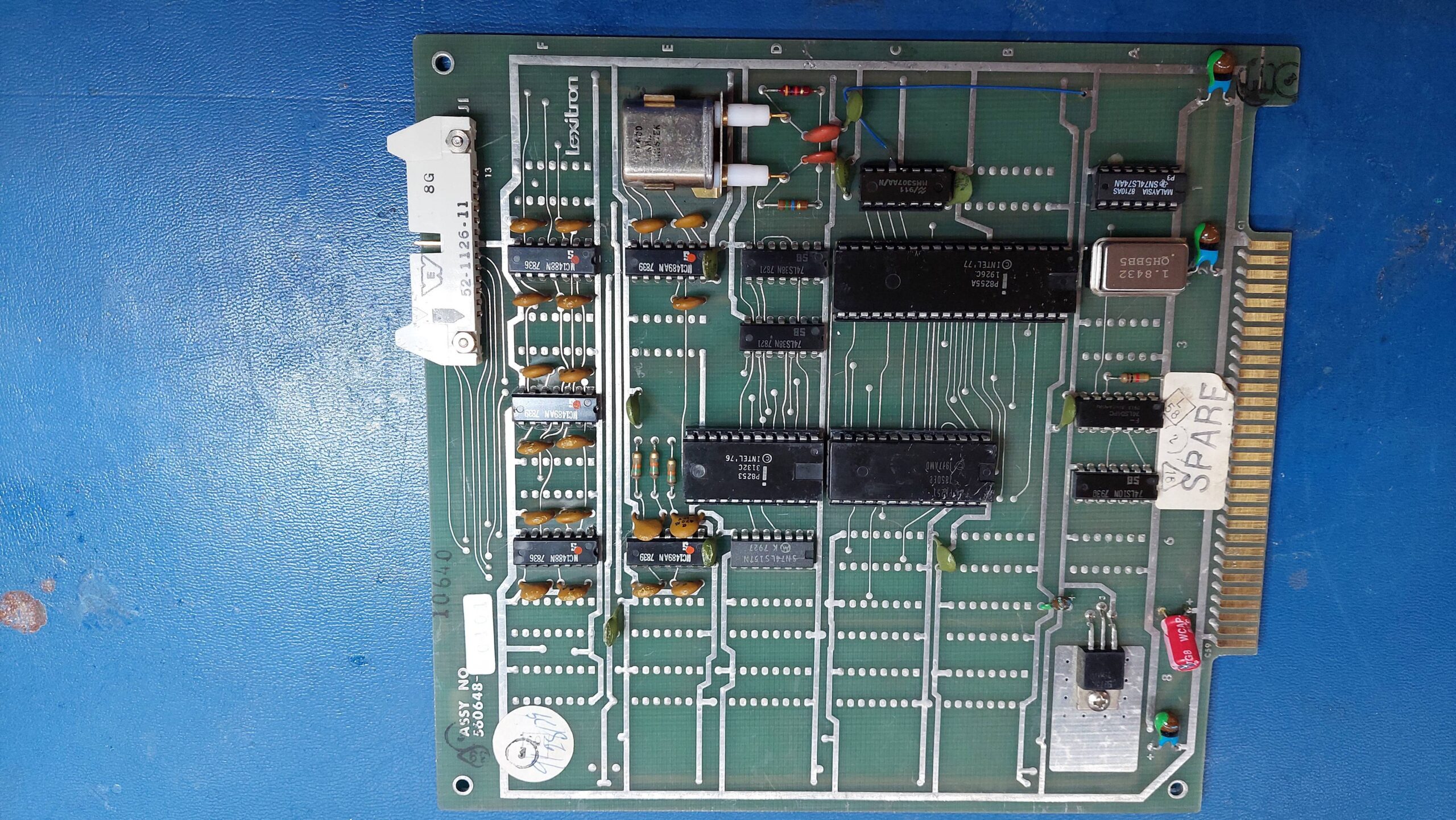
It has a 8251 programmable communication interface (PCI), an 8253 programmable interval timer (PIT), a 8255A programmable peripheral interface (PPI), and an MM5307 baud rate generator (BRG). It has a lot of RS232 drivers/receivers so i suspect that a bunch of parallel port lines use them.

I couldn’t be sure that this was the right card for either the VT1303 or the VT202 but i crossed my fingers and took the lid off the VT202.

Looking at the relationship between the PCI and the drivers/receivers, the pinout on the DIP connector was consistent with the usual RS232 pinout. The connector allows for external transmit and receive clocks, but there is some logic which allows the PCI to also use the clock from the onboard baud rate generator.

The card seemed to be in good condition. I checked for shorts on the power rails but found none. The spare slots in the card frame a little different to the slots that are home to the other cards, but the affected pins were not in use by the communications card.

Unfortunately the card developed a short on power up, resulting in the -15V fuse blowing. After replacing the offending tantalum capacitor and the fuse, the system started up ok with the board present.

I ran the configuration program on the CP/M disk to set port to 9600, no parity, one stop bit, 8 data bits. I also set up pun: and rdr: to use the serial port. I tried to get it to transmit data using:

pip pun:=rdr:

Alas, there was nothing so i started checking things out – which is a little laborious without an extender or a schematic. I did confirm that the card accessed both the PCI and the PPI, which i took as a sign that it was the correct card.

The PCI transmit/receive clock was missing and this was because the BRG was not oscillating. Everything around it looks ok:

  • Power lines
  • Crystal connected
  • Parallel control inputs from PPI changing as they should
  • Capacitors values are plausible

Currently, i’m concluding that the IC is dead which is a shame because it’s not easy to get.

In the interests of progress i pulled the IC and provided my own clock from a lab waveform generator. Frequency= 9600 x16 = 153.6kHz.

Lo and behold, there was communication:

Although the BRG is disappointing the overall result is very good. I can either knock together an emulator or try to source a replacement.

Before charging in, i decided to see if it was just the oscillator that was at fault. It would make life easier if the divider was still a going concern. I configured it for an external oscillator – again provided by a waveform generator. This seemed to work ok. It is possible that the oscillator fault is due to the crystal and the IC is actually fine.

Given some uncertainty about the crystal characteristics, testing that hypothesis seemed more trouble than putting together a replacement oscillator. There are plenty of spare footprints on the board.

Oscillator modules at 2x 921.6kHz = 1.8432MHz so i settled on that frequency. A flip-flop will divide by 2.
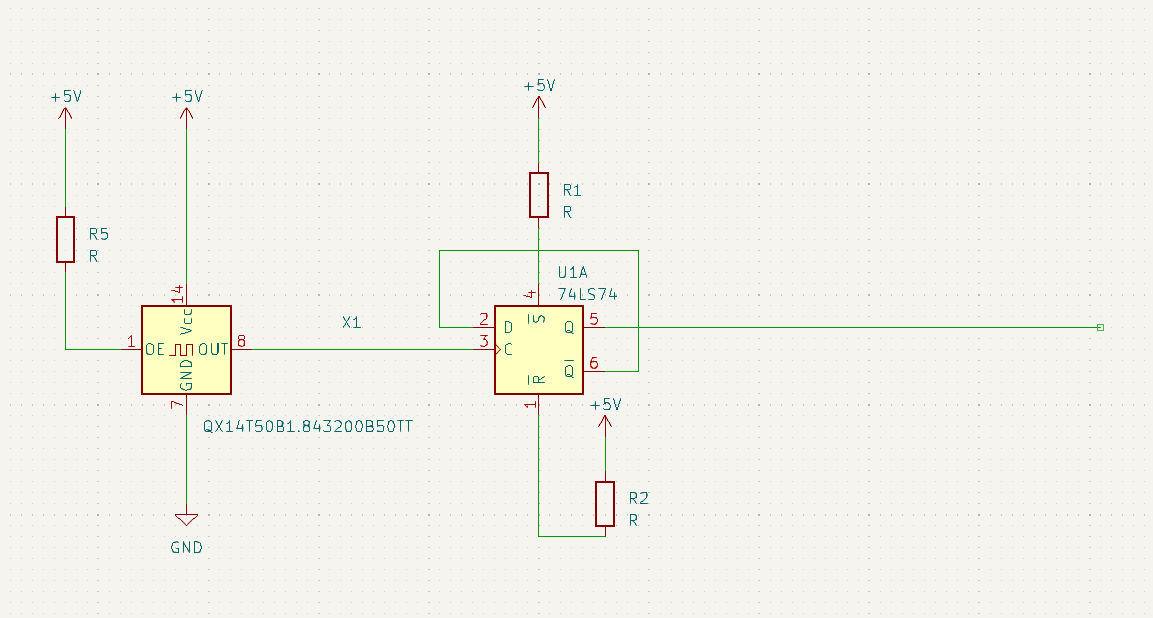
I built up the mod above and reconfigured the baud rate generator to use an external oscillator. It worked fine. The oscillator and divider are in the bottom left hand corner.
Unfortunately, i have found that the xon/xoff does not seem to work with data being sent to the lexitron. The configuration program does call the setting “output flow control” so i guess i should have been forewarned!

This means that i will either need to write a transfer program or adapt kermit to this machine – or i suppose i could attempt to write my own driver. I think the best course of action is to adapt kermit. I’ve never done that before and if i learn i might be able to make a version for the Osborne Executive as well.

The operating system seems capable of setting up the communication parameters so i would just need to correctly set the address of UART on an 8251 version of kermit.

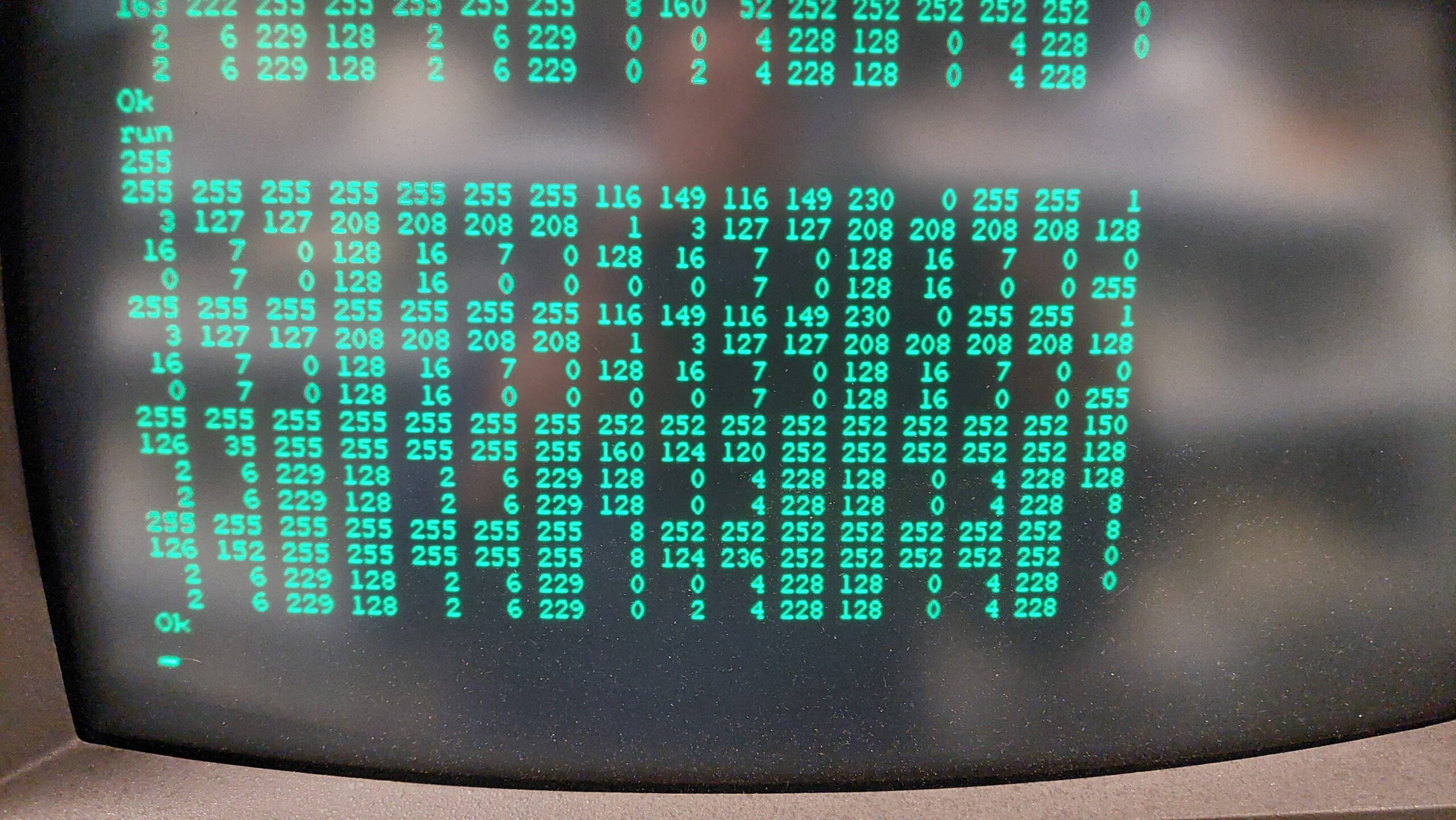
The first thing i need is the base address of the UART. I wrote a little basic program to read all the I/O locations and sent a character to the UART from a PC with the hope that it would appear in the data register of the UART. Sure enough it did “t”=116. It is at 48H and again at 4AH.
Actually, i may be able to use the generic version of kermit. In doing a bit more reading i see that there is a generic version that uses operating system calls. This version relies on the the CP/M IOBYTE being used by the Lexitron OS version. There is a speed penalty from using the generic version but i could live with that for now.

A handy place to start is here:

http://www.z80.eu/kermit.html

Kermit80 is distributed as a common part (CPSKER.HEX) and a customised part. The generic part for CP/M 2.2 is CPVGEN.HEX.

The initial transfers to the target machine are a little tricky because i needed to rely on the tools that were already present on the machine. In this case i have a serial port that can be accessed with PIP.

In principle, it should be possible to transfer hex files fairly safely using PIP as long as the OS supports XON/XOFF flow control. I’ve already discovered that this support is limited. That means that there is a risk that the computer will not keep up with the data. I experimented and found that it was quite reliable at 2400 baud unless the machine got distracted by some other I/O eg a disk write.

I had previously found that PIP has quite a good buffer and that 4k of data translated to hex (ie about 12k of text) does not trigger a disk write during the transfer.

CPSKER.HEX weighs in at about 70kB. I divided it up into 6 files and transmitted each one using kermit on a PC and PIP on the Lexitron.

Because the disks don’t hold a lot of data and the hex files are inefficient, there is some disk juggling to be done. I find it convenient to create working disks with a boot track and PIP, STAT, and LOAD. Two of these gives sufficient working space.

At the Lexitron i configured the serial card to use 8 bits, no parity, and 2400 baud and received with PIP via the RDR: device:

B> a:pip kerm0.hex=rdr:

At the PC:

Kermit> set port com4
Kermit> set baud 2400
Kermit> transmit cpsker.hex

Once the transfer is complete it is necessary to connect to the Lexitron as a terminal and send an end of file character, Ctrl-z.

I repeated this for kerm[1..5] and also for the custom file CPVGEN.HEX.

Then the files can be concatenated locally with PIP:

B> a:pip kerm411.hex=kerm0.hex,kerm1.hex,kerm2.hex,kerm3.hex,kerm4.hex,kerm5.hex

At this point the files are ready to be converted to an executable. The standard LOAD program can only do one file at a time. The kermit411 distribution includes a more advanced load, MLOAD, as a small hex file. I transferred it in the same way as above and then converted it to an executable:

B> load mload

And then created the kermit executable:

B:> mload kerm411,cpsker
B:> kerm411

Kermit on the Lexitron requires some setup:

Kermit> set port tty
Kermit> set file binary

Note that the baud rate is already set by the OS config program.

Then any file can be transferred using send and receive. I sent pacman95.com as a test. The terminal characteristics aren’t quite right, but it got there.

It does not sound like much, but this is a very important step forward for the Lexitron ecosystem. I should now be able to transfer a bunch of generic CP/M programs and data.

Using the terminal mode in kermit on the Lexitron is a little complicated by the unusual keyboard. I could connect using “connect” but i could not find the exit key. Shift-Menu does provide a menu though, and this does have a command to exit. More experimenting required.

At the PC end, timeouts occur during disk writes. The length can be increased to, say 10s, at the PC end with:

Kermit> set transmit timeout 10

The error limit can also be increased at the PC end:

Kermit> set retry limit 100
VT202/1303 BDS-C Compiler

Having got Kermit running on the Lexitron CP/M my attention could turn to adding some more applications. The Lexitron does have the limitation that it uses an 8085 microprocessor and that rules out any apps that assume a Z80. This seems, for example, to include Turbo Pascal. The Lexitron also uses 35 track single sided drives; the space available is only 140kB which is tight.

BDS-C was written for the 8080 and doesn’t require a lot of disk space. The author’s website provides the software, sources, and various other files for the last version, 1.6. It also has a video where he talks about the history of the compiler and more:

https://www.bdsoft.com/resources/bdsc.html

i was able to transfer the files to Lexitron floppy disks by means of kermit. Once i had set up a disk with just the essential items it was good to go.

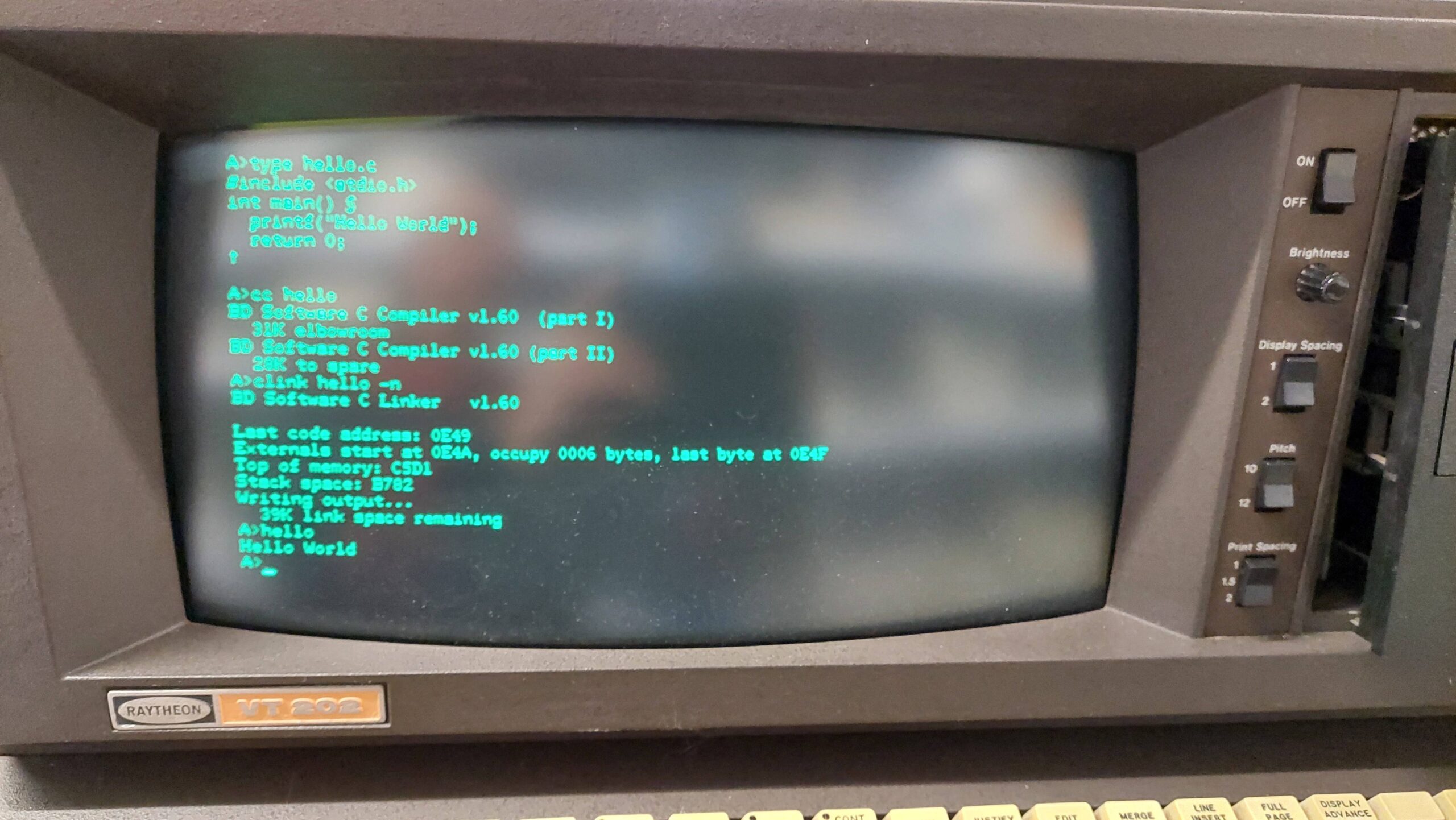
I started to punch in hello world and then realised that there were no braces {} on the keyboard. I eventually worked out that the ascii codes correspond to some unusual characters that the Lexitron uses so i just used them in place of the braces.

{ = §

} = †

Hewlett-Packard HP-85

HP called the HP-85 a calculator, but it was definitely a microcomputer.  It runs an HP designed Capricorn microprocessor at a seemingly slow 613kHz, but with native floating point operations it was excellent for scientific calculations.

Having had an HP-11C since my uni days, i have a soft spot for HP gear.  The computer itself was a quite a modest ebay purchase in about 2017, but i was aware when i bought it that it may be quite a project. 

It sucked me right in. There’s a lot of love out there for this machine and its brethren. Curious Marc has done as much as anyone to raise interest in this machine. There is a ton of data available from the HP Museum and more at the HP Series 80 website. There is also an email group. I found myself wanting to get the most out of it.

I replaced the tape drive capstan rubber and modified the capstan to accommodate QIC tapes, which are easier to find than the original DC100 tapes.  

At the back of the unit is an expansion bus that can accommodate I/O, RAM, and a ROM tray.  I added 16k RAM, HPIB, Serial, and PRM-85 ROM boards.  The PRM-85 mimics as many ROMs as i could have ever needed to poke into a ROM tray. 

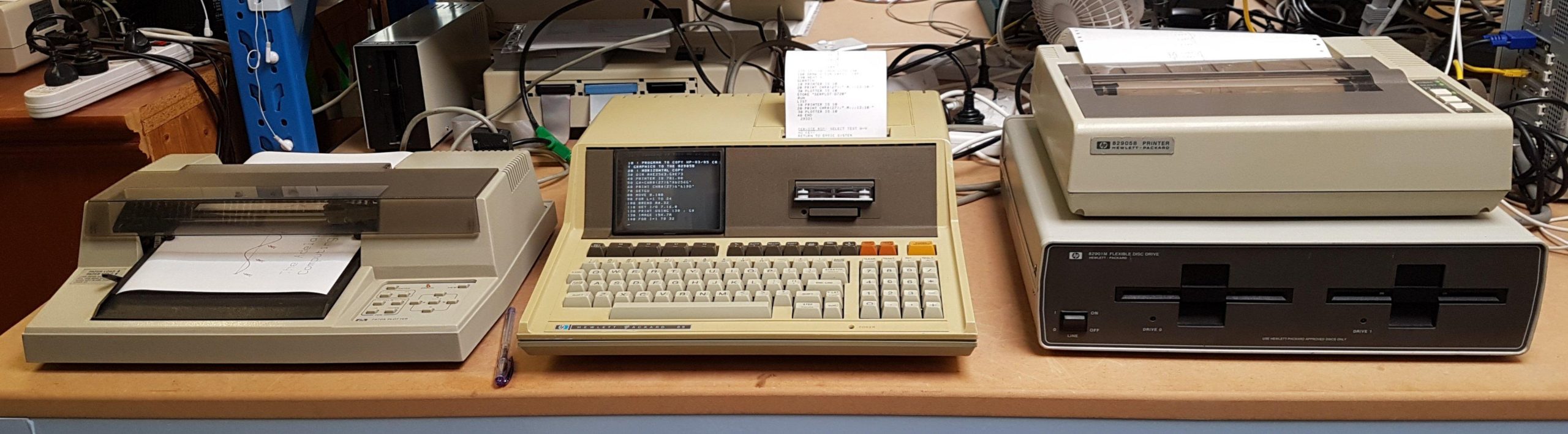
I added an HP-IB printer and a serial plotter (recently a friend found the HP-IB version for me – thanks Mike).  I asked if anyone on the Australian Vintage Computers FB page might happen to have a drive unit – sure enough, Ben just happened to have one at very reasonable cost.  I really appreciate the help that people give me to get things going.

The icing on the cake was when another group member offered me a box of DC100 tapes.  Thanks, Chris.  I’m in the process of refurbishing them with new drive bands. Maybe i will be able to revert the tape drive.

These days, an EBKTS board is the go-to for these machines. It’s a brilliant solution to either get started or just to experience everything the machine offers without the hassle of quite complex repairs or tracking down hard-to-get expansion modules and peripherals. It serves up disks and tapes from solid state storage.

The EBKTS wasn’t available when i started, so i was forced to do some hard yards. I don’t regret that; the tape and floppy drives add a lot of character. I will get an EBKTS at some stage, but the aussie dollar is pretty awful at the moment.

HP-85 Inspection and Power

The machine was plug and play – apart from the well documented issues with the tape drive. The capstan rubber turns to mush and can easily destroy a tape.

Destroying tapes was not an immediate issue for me, as i had none. It would soon become an issue, though, because tapes were the only means available to me at the time to load and save programs.

On power up, the machine displays a cursor for the basic interpreter. It is happy to immediately evaluate an expression and display the result.

The cursor can be moved around the screen to edit and reuse text. The screen rolls up and down, displaying 16 of 64 stored lines. This makes it pretty easy to use the small screen.

Basic programs are entered in the normal way. Data can be printed to the screen or to the thermal printer.

Inside, the machine is a joy to behold, with lots of ceramic packaged ICs and a neat arrangement of the CRT, thermal printer and tape drive. Outside, the case is quite yellow, but brightening cases is low on my to-do list.

HP-85 Tape Drive

Browsing the web quickly revealed that DC100 tapes were scarce and unreliable, and it was widely recommended that the tape drive be modified to accept QIC tapes, which are not as ancient and a lot easier to procure. I placed an order for tapes and set about attempting both the necessary mods and the capstan repair.

The tape drive mod is described in detail here. It requires a change in one resistor to account for the slightly different magnetic properties of the tape. This was easy.

The mod also required the wheel to grow a little to account for the slightly different dimensions of the cartridge. This was hard. The last thing i wanted to do was to put the existing capstan in the hands of a tradesman because i feared for the rotary encoder.

Instead, i crafted a piece of plastic to glue to the top of the capstan. After a few tries, i got it to bond. I use the drive sparingly (i now have better alternatives), but the extension is still there many years later.

I worked through several versions of rubber replacement and eventually i had success with 6/9mm surgical rubber tubing.

Reliability is not great but, it is good enough to demonstrate operation. QIC tapes are tight in the drive slot, which makes them a little tricky to insert. I found that if i kept the front screws of the enclosure a little loose, it was easier to insert. Not great but acceptable. The alternative is probably a file.

Of course, once you have a tape drive and some viable tapes, there is the small matter of getting software on to the tapes.

HP-85 Disk Drive

The HP-85 tape drive was never going to be a daily drive proposition and the HPDrive emulator, good as it is, is a bit unwieldy for a convincing demonstration. I really needed (wanted?) a disk drive.

I kept an eye out for a disk unit.  They are usually very expensive and i’ve only seen them listed for sale in the states, from where the cost of postage is horrendous.  I did find a cheap 3.5” unit, but the thought of paying nearly $200 for postage prompted me to scream for help on one of the facebook groups.

To my surprise a gentleman Ben G happened to have a M82901 Dual Drive uniit out in a container at his property in NSW.  He was kind enough to send some pics, explain the unit’s shortcomings, offer it at nominal cost, and arrange for its dispatch. That was a generous thing to do.

When it arrived it was clear from some dents and gouges that it had landed very heavily at some stage.  Ben said that he’d recovered it from a gold recycler. 

There were rattles in the box and once opened some damage was apparent.  Both of the drives had parts of the plastic broken.  The interface card was only secured by a couple screws used to secure the circuit card on the right drive.  Not a great effort from HP really but I guess they weren’t planning on the unit being thrown on the scrap heap.

I attempted to glue things up but it will always be fragile. I pulled it all apart, cleaned it up, checked the supplies and put it all back together.

The drives are PC style double height double sided units. The heads were not moving easily so they needed some lubrication and bit more rough treatment to get them moving again. Once they were free, i connected them to a PC for alignment using ImageDisk.

One was pretty good on the PC but the other had some issues formatting; successful but with lots of retries so I subbed in a known good spare drive.

There’s a set of dip switches that set the HP-IB address.  The drives are referenced by “:D720” where the second digit is the HP-IB address and the third is the disk drive number. 

Format with:

INITIALIZE “<label>”,”:D720”

The drive unit failed to communicate.

Fortunately, the manual was available online and the unit has built in self tests.  It took a while to work out how the tests worked and they seemed to produce very erratic results.  It seemed to consistently show that the RAM test was failing so I ordered some new RAM.  128 byte static RAMs.

I also read back the ROMS using an EPROM programmer and that suggested that one ROM didn’t seem to be working. I scrambled to see if the binaries were online.  Fortunately there were.

The natural replacement would be 2716 EPROMS but I only had 2732 EPROMs.  They have a compatible footprint but with the upper half being the active portion.  My EPROM and cheap EPROM programmer did not play nicely together but eventually i convinced myself that i had two working EPROMs.

After spending a long time searching for a problem which turned out to be incorrect configuration, i was able to get all of the tests to pass with a known good drive.  That meant the controller was good.  Even better the unit worked with the HP-85!!

Neither of the two original drives wanted to play the game. I had a good look at the writes on the first drive.  Everything looked good except the signal on the top head was different to the bottom – about half the size.  That made me have a closer look at the head which I discovered had been damaged – it looked like a piece of ferrite was missing.

The other drive’s heads seemed ok, and I’d checked the first drive’s electronics pretty thoroughly, so I thought I might get a second drive working by swapping the electronics card.  That worked.

Sure enough the HP 85 could happily operate two drives.

The other original drive now has an electronics fault as well as a drive head fault! 

I needed some disks to try it all out.  The teledisk images I had seemed to often be for 3.5” drives and wouldn’t write to 5.25” disks.  Instead i used the HPdrive emulator and copied them across:

COPY “:D700” to “:D720”

It’s not fast.

I found many of the disks would not run unless labelled correctly.  The failing line of basic revealed the required label.

VOLUME “:D720” IS “STDPAC”

I could copy from the tape drive to disk:

COPY “:D700” to “:T”

HP-85 External Printer

I spotted an HP 82905 printer on ebay.  It was made by Epson. I’d never seen an HP-IB printer come up before, so I grabbed it.  I figured that it would be cheaper to run than the thermal printer.  I was hoping that it might be good for Centronics as well, but not so.

It needs the Plotter/Printer ROM, which I was surprised to find was not on my PRM-85 super ROM. See the post on the PRM-85.

The printer can be set to be the default printer:

PRINTER IS 701,80

where 7=GPIB and 01=GPIB address – set with DIP switches under secret panel on top of the printer.

I punched in the screen plotting program in Application Note: Copying CRT Graphics from the HP-83/85 to the 82905B.

HP-85 PRM-85

The HP-85 comes with a Tape Drive, a Thermal Printer, a CRT display, 16k of RAM, and Basic in ROM. Out of the box, there is no external I/O, but it does have a 4 slot expansion bus that can accept modules, of which there are many.

The expansion bus not only allows additional I/O to be added but also additional RAM and ROM. Probably the most important I/O to be added is a HP-IB interface to support connection to many peripherals and instruments.

The addition of ROMs allowed command set enhancements and in many cases the use of additional I/O or peripherals needed enhanced commands. eg the use of disk drives requires the addition of a mass storage ROM and an enhanced mass storage ROM. A plotter requires the addition of a Plotter/Printer ROM.

ROMs were sold individually and were plugged into a ROM tray that plugged into the expansion bus.

The exercise of finding the individual ROMs and the ROM tray requires deep pockets and patience. Noting that providing code in ROMs is fairly easy to do, it was a matter of time before an alternative solution appeared.

The HP computer community is awesome and some years ago a couple of gents (Bill Kotaska with support from John Shadbolt) developed an expansion module, PRM-85, that emulates a ROM tray.

I had gathered an HP-IB and serial cards, and I had a serial plotter and an HP-IB printer. I also wanted to be able to use HPDrive to emulate disk drives via the HP-IB interface, including SS/80 protocol. To achieve this, i needed the following ROMs:

  • EDISK (85B version – supports Extended Mass Storage
  • Mass Storage (85B version) – supports Extended Mass Storage
  • Extended Mass Storage – Supports SS/80 protocols
  • Input/Output – Supports HP-IB and Serial interfaces
  • Plotter/Printer – Supports plotter peripherals

All the ROMs have been captured and can be loaded into the onboard ROM.  I contacted Bill in 2018. They had done a small run the previous year and had one left, which I purchased for much less than the combined cost of the original tray and ROMs. The details are here. ROM info is here.

The “85A without EMS” uses the first ROM socket on the PRM-85. It uses the 8 predefined addresses below:

Jumper J10 Decoded
Contact#   ROM Address  ROM Name
---------- ------------ --------------------
  17       232 (E8 Hex) Advanced Programming
  18        40 (28 Hex) Assembler
  19       224 (E0 Hex) Service-85
  20         8 (08 Hex) Program Development
  21       208 (D0 Hex) Mass Storage
  22       176 (B0 Hex) Matrix
  23       192 (C0 Hex) Input/Output
  24       207 (CF Hex) Extended Mass Storage

But for the 85 to use SS/80 disk storage requires the “85A with EMS” Super ROM. This Super ROM replaces the Program Development ROM (08H) with the 85B EDISK ROM (D1H) and the Mass Storage (D0H) with the 85B Mass Storage ROM (also D0H). The address D1H requires DIP Switch 1 as it is not one of the predefined addresses.

Jumper J6/9/10 J6=1-8, J9=9-16, J10=17-24
Contacts  ROM Name
--------  ---------------------
 9 to 17  232 (E8 Hex) Advanced Programming
10 to 18  40 (28 Hex) Assembler
11 to 19  224 (E0 Hex) Service-85
 4 to 12  209 (D1 Hex) EDISK (85B version) - set address with first DIP Switch
13 to 21  208 (D0 Hex) Mass Storage (85B version)
14 to 22  176 (B0 Hex) Matrix
15 to 23  192 (C0 Hex) Input/Output
16 to 24  207 (CF Hex) Extended Mass Storage

The second ROM slot on the PRM-85 is available. It can take up to a 27C512 for 8 x 8k slots.  I had a 27C256 so that was 4 slots.  Practically, though, the only addresses left were the predefined 08H and the second DIP switch.

Active Enable  ROM Image Start Address (Hex) 
Signal (pin)   2764 27128 27256 27512
------------- ----- ----- ----- -----
Enable 0 (9)   XXXX  XXXX  XXXX  0000
Enable 1 (10)  XXXX  XXXX  XXXX  2000
Enable 2 (11)  XXXX  XXXX  XXXX  4000
Enable 3 (12)  XXXX  XXXX  XXXX  6000
Enable 4 (13)  XXXX  XXXX  0000  8000  =>Prog Dev (08H)
Enable 5 (14)  XXXX  XXXX  2000  A000  =>Plotter/Printer 
Enable 6 (15)  XXXX  0000  4000  C000
Enable 7 (16)  0000  2000  6000  E000

I could add the Plotter ROM (F0H) using the DIP switch and pop the Program Development ROM (08H) in next to it.

Jumper J7/8 J7=1-8, J8=9-16
Contacts        ROM Name
--------        ---------------------
4  to 20(J10!!) 8 (08 Hex) Program Development
5  to 13(J8)    240 (F0H)  Plotter/Printer  - set address with second DIP switch

I think i could probably add a couple more ROMs to the second EPROM. They could not be used at the same time as the Plotter/Printer ROM. The link from J7-5 to J8-13 would need to be changed and the second DIP switch changed to the appropriate address.

ROM Name               Number Switch settings
---------------------- ------ ---------------
Advanced Programming 2  231   11100111
Matrix 2                177   10110001
Plotter/Printer         240   11110000

HP-85 HP-IB & Drive Emulator

Having a computer that can write and read tapes is great but, that left the problem of getting software on to the tapes.

The HP-85 doesn’t have a lot of I/O built-in but, it does have 4 expansion slots that can accommodate various adapters such as HP-IB (GP-IB), serial port, and a ROM tray for expansion ROMs.  

The most popular technique for file transfer is to connect a disk drive to the HP-IB adapter.  I also considered using the serial port but, I wasn’t sure that it would work.

So I needed HP-IB adapter.  And, of course, to get a HP-IB adapter to work with a disk drive requires some expansion ROMs.  Actually, if it had been an HP 85B instead of an HP 85, they would have been built in.  It wasn’t though.

That meant I needed an HP-IB adapter, a ROM tray, and the various ROMs.  None of this stuff is easy to come by. I did find a few vendors in the US with most of the items – unfortunately at high cost, high postage, and low interest in going to any trouble. This led me to the PRM-85. See my separate post on this.

I found a GPIB card in Australia on ebay, so I grabbed it. 

There are not many computers that use HP-IB for their disk interface (the Commodore PET is one) so only an HP drive unit will do, and they are even rarer than DC100 tapes. 

The HP computer community is awesome, though.  Recognising that HP drives were becoming very rare, a chap from the HP 9845 project set about creating an emulator called HPDrive.

It runs on a PC with a GP-IB adapter installed, and it is particularly good. I followed the instructions at:

http://www.hp9845.net/9845/projects/hpdrive/

GP-IB cards are generally expensive but, fittingly for such a project, I found a reasonably priced National Instruments ISA card that seemed suitable (suitability is described in detail at the project site). 

Then of course I needed a computer with an ISA slot.  I had an old Windows 2000 machine stored in pieces that had a slot (I had some other older options as well) so I set that up with the downloaded disk images. I’m never short of a project.

And it just worked. To get the disk catalogue type:

CAT “:D700”

My notes were a bit sketchy about how i set this up so i recently fired it up again to gets some details. Unfortunately, part way through that exercise the PC motherboard developed a fault and i have not been able to resolve it. That means i will go through the exercise again sometime in the next couple of months!

HP-85 7470A Plotter

An HP 7470A plotter appeared on gumtree. It’s a serial version rather than the HP-IB version, but i thought i might be able to make it work. The bloke who sold it to me, Bob, was an absolute gentleman – even offering to turn up pen holders on his lathe!

It’s quite a simple little plotter that uses only two pens.

The plotter itself needed a drop of oil on the rail, but otherwise worked fine.

The manual lists the HP-IB version as the one to use with the HP-85, so I had a bit of reading to do to work out if it could work over the serial line. In principle, it could be done by directing the plotter output to the serial line:

PLOTTER IS 10

Many people have reported that this causes the HP-85 to just hang.  There was some suggestion that this was due to the serial version of the plotter sending just a CR rather than a CR/LF at the end of its transmission. (10 is actually set on the serial card.)

https://forum.vcfed.org/index.php?threads/serial-plotting-on-the-hp85.41043

The last post which came very late is key.

The plotter can be programmed to send a CR/LF.  I did the required reading and found that this worked:

PRINTER IS 10
PRINT CHR$(27);”.M;;;13;10:”
PLOTTER is 10

No hang!  I tried some test code and found that I could send HPGL and use the HP 85 plotter commands.  I didn’t have any success with the Graphics Presentation software on disk.  I suspect that it resets the interface.  There may be a workaround for that, but I’m not overly concerned.  I don’t mind writing a bit of BASIC to make the plotter do its thing.

I used 2400 baud, 8 bits, 1 stop bit, no parity as per the serial card.  This is done through DIP switches next to the serial connector.  The serial card and the plotter both had female connectors but the transmit/receive was reversed so I just used a M-M gender changer between them.

The plotter commands are the same as for the screen.  Using PLOTTER IS 10 points them to the plotter instead.

The HPGL codes are in the plotter interfacing manual. 

Comms are more reliable with flow control.  I’ve used xon/xoff a lot in the past – this sets up the machine and the plotter to use xon/xoff.

Xon/xoff at plotter – 7470A Interfacing and programming manual

PRINTER IS 10
PRINT CHR$(27);”.M;;;13;10:”
PRINT CHR$(27);”.I;;17:”
PRINT CHR$(27);”.N;19:”
PLOTTER is 10

Xon/Xoff at computer – 82939A Serial Port Manual

I changed the DIP switch settings on the serial card to suit the datacomms pac, so the settings for the plotter need to be programmed.

CONTROL 10,3 ; 11 ! 2400 baud
CONTROL 10,4;7 ! No parity, 2 stop bits, 8 data bits

The I/O ROM provides a command, TRANSLATE, which converts a program to play nicely with it.  Load the program (eg CALEND in the standard pac, and type TRANSLATE.  It can then be STORED as an external plotter variant. 

For the serial plotter, load and run the instructions above and then load and run the external plot variant.